SPITE: Ashes Of Ephtael
Quick info
Engine:
LAMP ENGINE (In house engine)
Focus:
Contributions
• I worked on the animation system and animation state machine
• I created debug tools to debug animations in runtime
• Added support for blended animations as well as blending between frames
• I developed the final boss of the game creating all logic and combat
• Basic inverse kinematics tailored for the boss to be able to stare at the player
Animation System and State Machine
At the beginning of the project, I worked on creating a State
Machine that was used throughout the rest of the project. Because of this, I collaborated
closely with our animators to build a system that had functionality for everything they wanted
to use.
In addition, I worked together with our animators and discussed different solutions to problems
and requests.
Json Maker
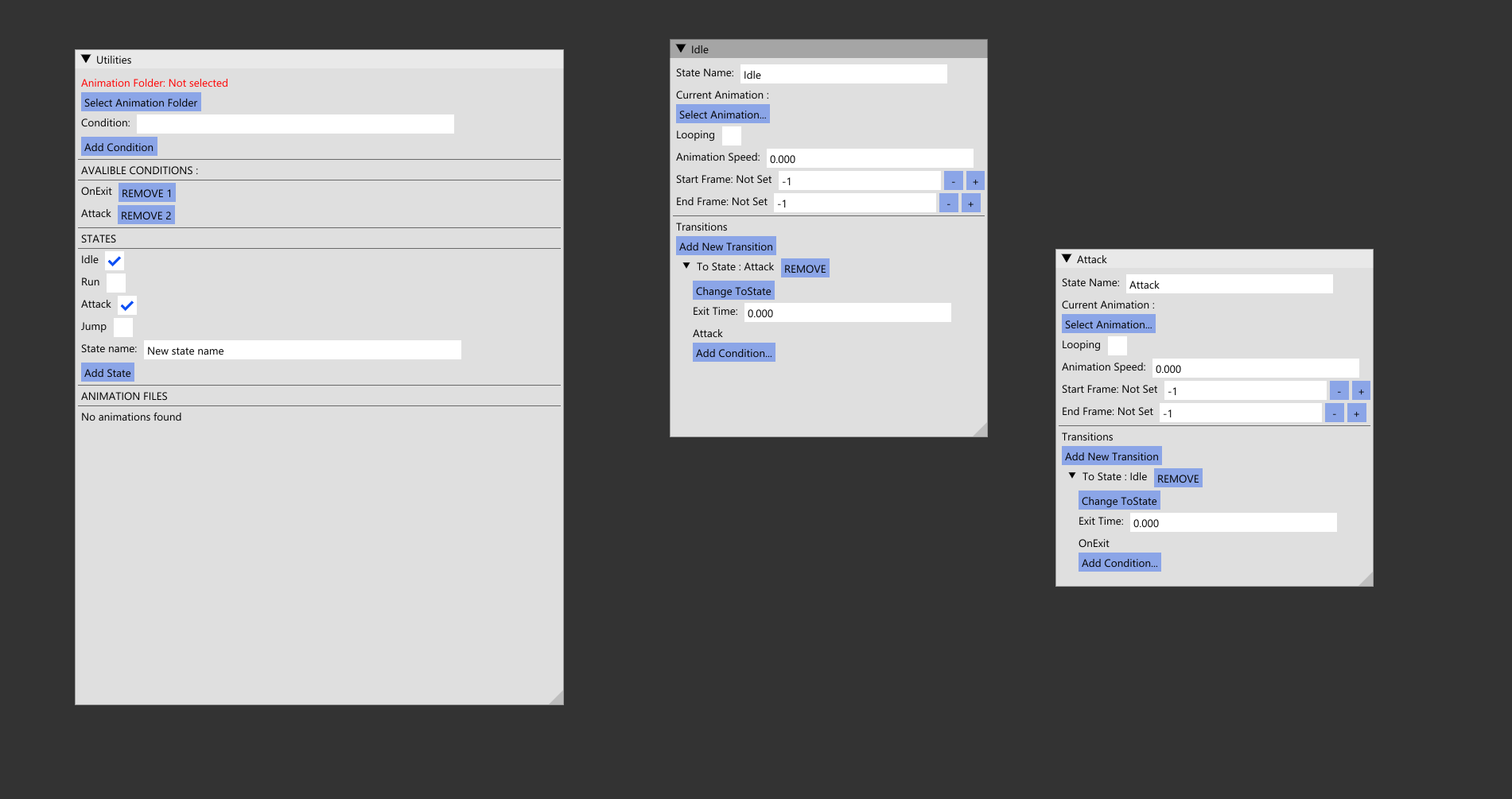
I also developed tools to simplify the creation of State Machines, since it becomes quite messy to manually modify everything through a JSON file. As I developed the State Machines, I also needed a way to test and debug them, so I created tools to display all relevant information about states, as well as the ability to set states and test them to ensure that animations and transitions looked correct without needing help from programmers.
Animation Debugger
I created a debug tool for animations and states using ImGui, It has been a very useful
tool to find bugs and narrow down from where animation errors come from.
It
allows me
to force push conditions and animations to test transitions and blending in a controlled
environment.
I learned that building tools requires not only good communication but also sitting down with
the user understanding what needs to be changed to fix issues. I modified a debugging tool after
observing problems while watching a user interact with it.
In the first draft of the
debugger, you had to type everything exactly right or else nothing would work, which made it
very frustrating to use. This was resolved by converting all options into buttons, making it
much easier to use.
Boss enemy
I created all functionalities for the boss such as combat stages, attacks, inverse kinematics for looking at the player and attacks, implementing decals and water rising.
Inverse Kinematics
One problem we had was that the boss fight would allow the player to run around in a large arena,
meanwhile the boss would be stagnant and not reposition. This problem left us with some options
We could have animated one attack and simply rotate the boss towards its target. However, this is
quite hard to make good looks and would give a bit of a lazy feeling to the boss.
Then I got the idea of manipulating the mesh to move where I wanted it to be.
Testing my plan
I began testing in my directX11 renderer to figure out how to make it possible. I ended up
adding some helper functions in my math library to be able to move 3D transformation
matrices in and out of local and global spaces, most important was
ParentAndKeepWorldRelative.
My plan was to hijack the animation system and move the mesh skeleton joints after the animation component was done and then write the new joint transformations into the animation buffer.
In simpler terms:
2. Read the skeleton and the relevant joints and re-parent them
3. Calculate the new joint positions.
4. Write back the joint transforms into the animation buffer.
Add some duration and the inverse kinematics make the boss feel way more dynamic.
Inverse kinematics are also used in the boss's attacks enabling it to attack multiple areas with the same animation.
I made sure to disable the inverse kinematics during the boss's death animation as well as some attacks to make sure it didn't look weird.